

Make Home Assistant listen on 443

Home Assistant

Home Assistant defaults to port 8123. That is fine, but it forces URLs like:

  • https://assistant.home:8123

Since version 2026.8, new installations of Home Assistant default to an address without the :8123 suffix.

If you already have local HTTPS working (for example with a self-signed cert), switching to port 443 lets you use the cleaner, standard URL:

  • https://assistant.home

What changes (and what does not)

  • Home Assistant will still serve the same UI.
  • Only the listening port changes from 8123 to 443.
  • You still need a certificate configured in Home Assistant.

Step 1: Make sure port 443 is available

Port 443 can only be used by one service on that machine.

Some quick checks:

  • If you run something like Nginx, Caddy, Traefik, or another web UI on the same host, it might already be on 443.
  • If 443 is taken, Home Assistant will fail to start (or will not bind to the port).

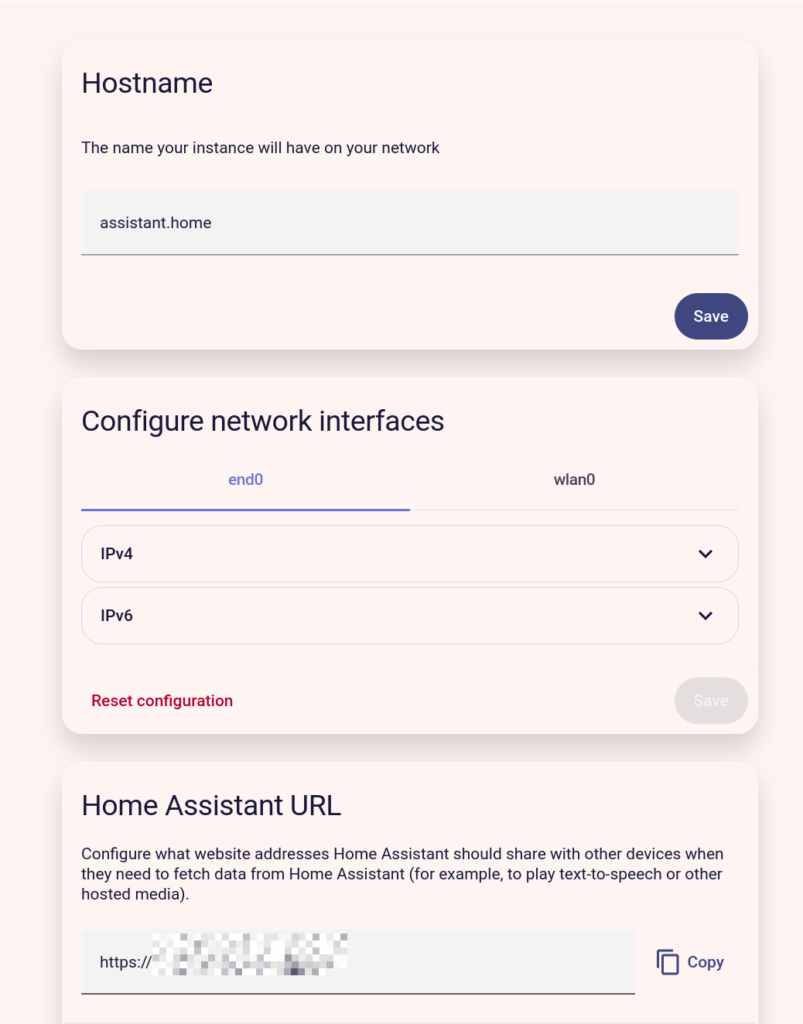
Step 2: Edit network configuration

Edit the network configuration in Settings -> System -> Network.
Step 3: Restart Home Assistant

Restart Home Assistant via:
Settings -> System -> Restart

After the restart, Home Assistant should be reachable at:

  • https://assistant.home

Step 4: Test and clean up old URLs

  • Your old URL https://assistant.home:8123 will stop working (unless you also keep something listening on 8123).
  • Update bookmarks, dashboards, or apps that still point to :8123.

If your browser behaves oddly, test in a private window and clear site data for assistant.home.

Share on Mastodon

About Marcel Bootsman

Marcel discovered the web in 1995. Since then he has paid attention to and worked with lots of technologies and founded his own WordPress oriented business nostromo.nl in 2009.

Currently Marcel is Partnerships & Community Manager EMEA at Kinsta where he helps clients and partners grow with their business with Managed Hosting for WordPress.

You can contact Marcel on a diverse range of online platforms. Please see the Connect section on the homepage for the details.

Comments

2 responses to “Make Home Assistant listen on 443”

  1. Willem Avatar
    Willem

    Ik heb deze handleiding gevolgd maar krijg bij opnieuw opstarten van HA deze melding:

    De HTTP-configuratie in configuration.yaml is al gemigreerd en wordt nu genegeerd. Verwijder het http:-blok uit je configuration.yaml. Beheer de HTTP-configuratie via de gebruikersinterface onder Instellingen > Systeem > Netwerk.

    HA versie info:
    Installatiemethode Home Assistant OS
    Core 2026.8.2
    Supervisor 2026.07.5
    Operating System 18.2
    Frontend 20260729.7

    1. Marcel Bootsman Avatar

      Hi Willem, thanks for your comment. Some things have changed in hoe these settings are applied. I have updated the post, please take a look.
      In short, you can remove the whole http: block from you configuration.yaml file. (Always make a backup before applying changes to yaml files)

Leave a Reply

Your email address will not be published. Required fields are marked *